🎬 Like this video? Subscribe to our YouTube channel for more electronics projects!
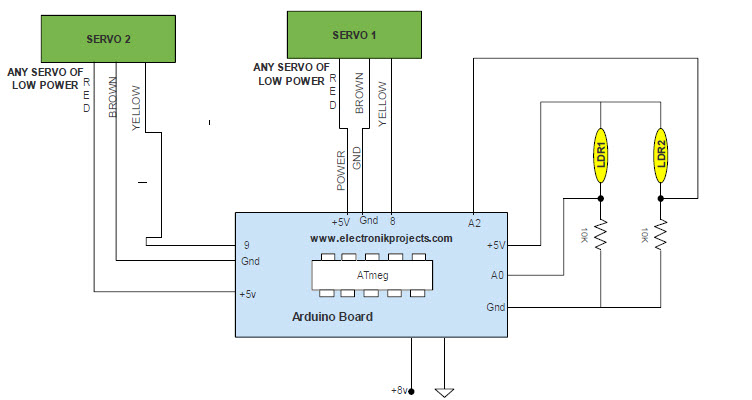
This Arduino sketch uses the Arduino IDE along with the Servo library Arduino to control two servo motors based on light sensor input. At the beginning, two servo objects (myservo and myservo1) are created, along with variables to store their positions (pos, pos1). Two analog pins (A0 and A2) are assigned to light sensors, which will provide varying voltage readings depending on the amount of light detected. In the setup() function, each servo is attached to a digital pin (8 and 9), allowing the Arduino board to send control signals to them.
Inside the loop() function, the program continuously reads the light intensity from both sensors using analogRead(), which returns a value between 0 and 1023. Since servo motors operate within a range of about 0 to 180 degrees, these readings are converted using the map() function to a range of 0 to 179. The constrain() function is then used as a safety measure to ensure the values stay within valid servo limits. This processed data determines the angle at which each servo should be positioned.
Finally, the code sends the calculated positions to the servos using the write() function, making them rotate according to the light levels detected. A short delay of 100 milliseconds is added after each movement to stabilize the motion and prevent excessive rapid updates. Overall, this program effectively creates a simple light-responsive system—often used in projects like solar tracking or light-following mechanisms—where each servo adjusts its angle based on the intensity of light sensed on its respective input.
No questions yet — be the first to ask!